Git 오류 발생 시 해결방법
먼저, git push 했을 경우 아래와 같은 Error를 본 적이 있을거다.
이 오류가 발생했을 때 해결 방법은 의외로 간단하다.
$ git push -u origin master
Username for 'https://github.com':
Password for 'https://':
remote: Support for password authentication was removed on August 13, 2021.
remote: Please see https://docs.github.com/en/get-started/getting-started-with-git/about-remote-repositories#cloning-with-https-urls for information on currently recommended modes of authentication.
fatal: Authentication failed for 'https://github.com/selimkim/oauth_test.git/'
1. 먼저, gitHub 홈페이지에 로그인 한 후 설정을 클릭한다.
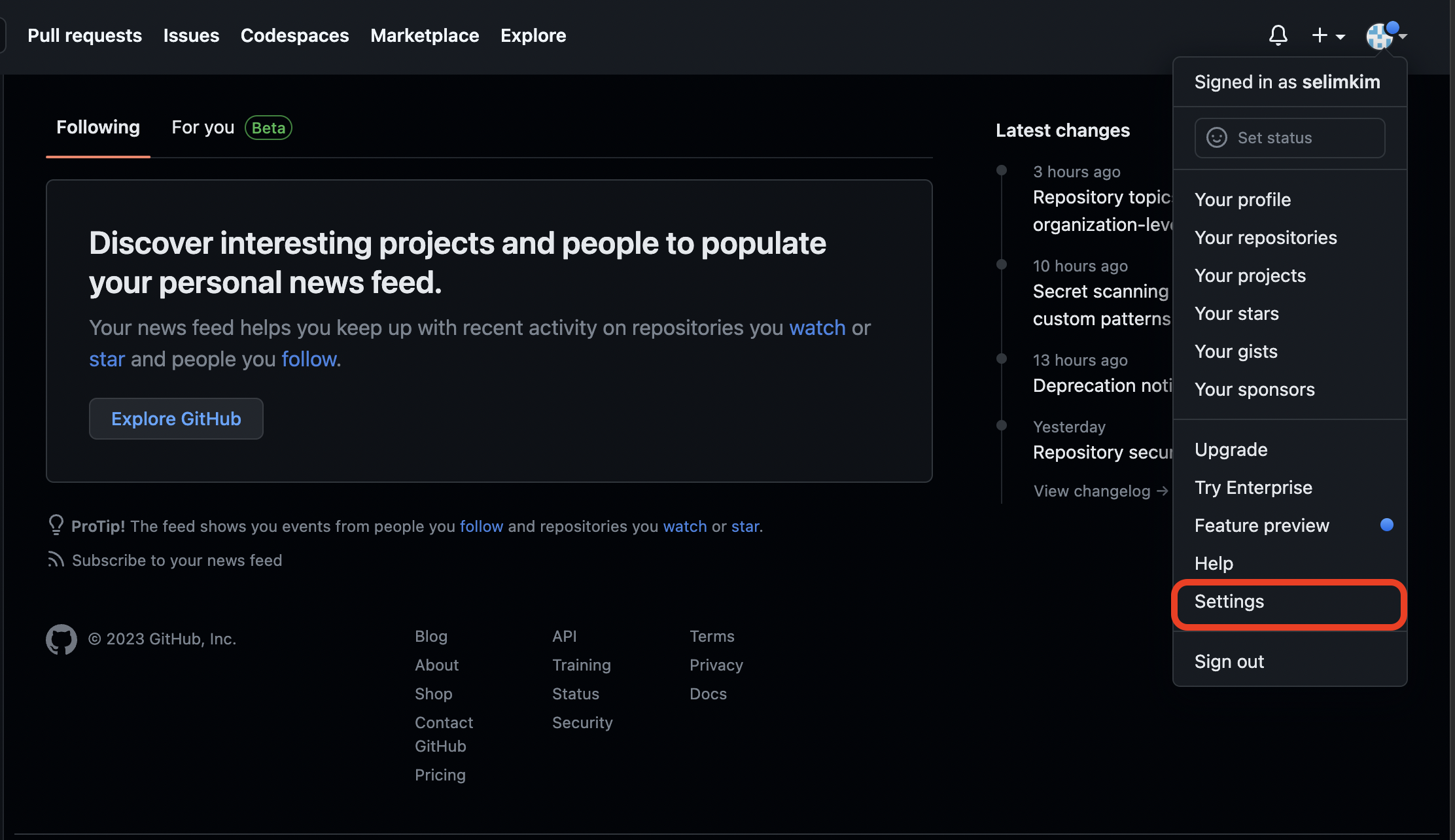
2. 설정페이지에 들어오면 맨 하단의 devloper settings 을 클릭한다.
(바로 접속가능한 주소는 하단에서 확인 가능!)

3. personal access token을 클릭한 후 오른 쪽에 있는 Generate new token을 클릭하여
토큰을 생성한다.

4. 원하는 사용처와, 기간을 입력한 후에 [Generate Token] 을 클릭한다.

5. 생성된 토큰을 복사한 후에 터미널에 등록한다.
토큰은 1번만 보여지기 때문에 꼭 복사먼저 하고, 터미널에 등록한 후에 창을 꺼야한다!
$ git config --global user.password "복사한 토큰 입력"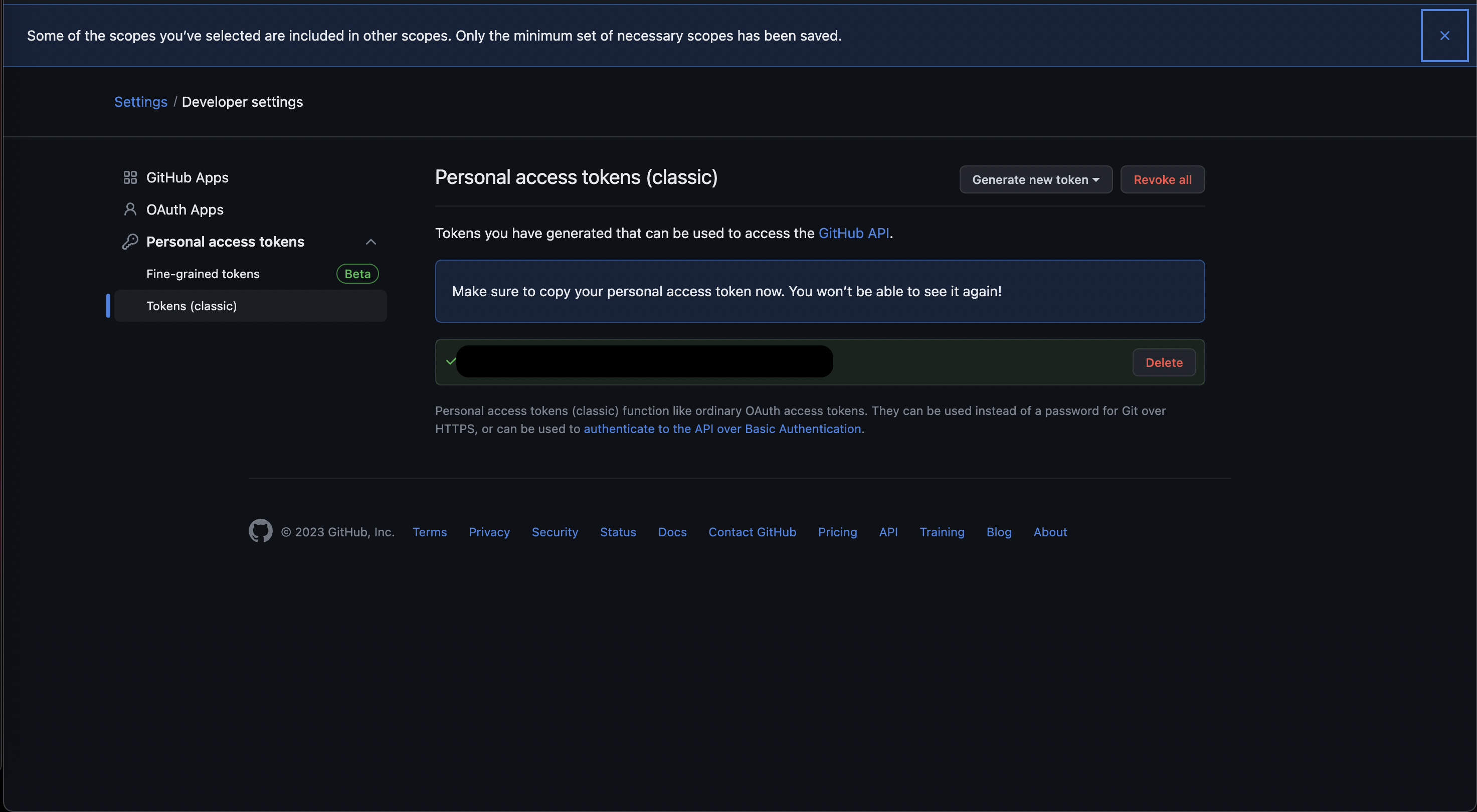
6. 토큰 등록이 완료되면 다시 git push 명령어를 실행하고,
비밀번호 입력하는 부분에 토큰을 입력한다.
* 반드시 비밀번호가 아닌, 토큰을 입력해야 한다!
$ git push -u origin master
Username for 'https://github.com':
Password for 'https://':

오브젝트 나열하는 중: 1905, 완료.
오브젝트 개수 세는 중: 100% (1905/1905), 완료.
Delta compression using up to 10 threads
오브젝트 압축하는 중: 100% (1889/1889), 완료.
오브젝트 쓰는 중: 100% (1905/1905), 4.60 MiB | 3.24 MiB/s, 완료.
Total 1905 (delta 208), reused 0 (delta 0), pack-reused 0
remote: Resolving deltas: 100% (208/208), done.
To https://github.com/selimkim/oauth_test.git
 * [new branch]      master -> master
branch 'master' set up to track 'origin/master'.
https://github.com/settings/apps
GitHub: Let’s build from here
GitHub is where over 100 million developers shape the future of software, together. Contribute to the open source community, manage your Git repositories, review code like a pro, track bugs and fea...
github.com
'DevOps > Git' 카테고리의 다른 글
| [Git] Git + Netlify를 사용하여 사이트 배포하기(무료 호스팅 하는 방법) (0) | 2023.04.23 |
|---|---|
| [Git] Intellij 스프링부트 프로젝트 GitHub 연결하기(2) - 터미널을 이용하여 GitHub 연결하기 (0) | 2023.04.01 |
| [Git] Intellij 스프링부트 프로젝트 GitHub 연결하기 (1) (0) | 2023.03.26 |


